
Melchior & HD2Clans v6.0: The Campaigns Update!
All the way back in May 2025, the first version of Melchior-1 launched, with the goal of allowing clans everywhere to track their impact while playing Helldivers 2. Our very first Alliance Orders saw around 40ish clans participating together. At the time this post was written, HD2Clans.com had 1,848 registered clans, and 1,647 Discord servers have Melchior installed.
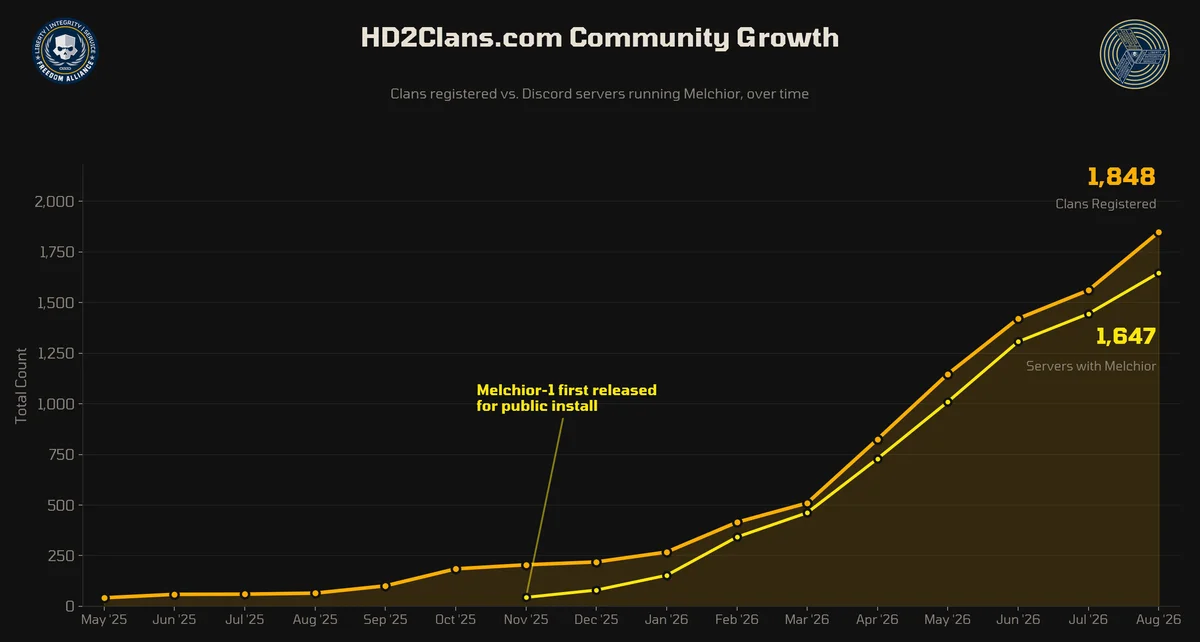
We could not be more proud to grow alongside you, and to know that Melchior-1 is taking the Helldivers galaxy by storm.
All this time, we've been watching how clans use Orders, and listening to your requests. In past updates, we focused on The Hangar and on giving you a free real-time strategy game, Fleet Conquest. It's been long overdue to ship another big Melchior update - and today, the Version 6.0 Update has landed. Let's dive in!
Campaigns
We've found that some clans love creating extended narratives and using multiple Orders for their clan to experience that narrative. So we designed Campaigns to let you connect multiple Orders together into a series. Instead of two unrelated operations, they become Part 1 and Part 2 of a Campaign. Campaigns get their own whole webpage showing the list of Orders, combined stats across all the Orders, and every award you created for the Orders along the way.
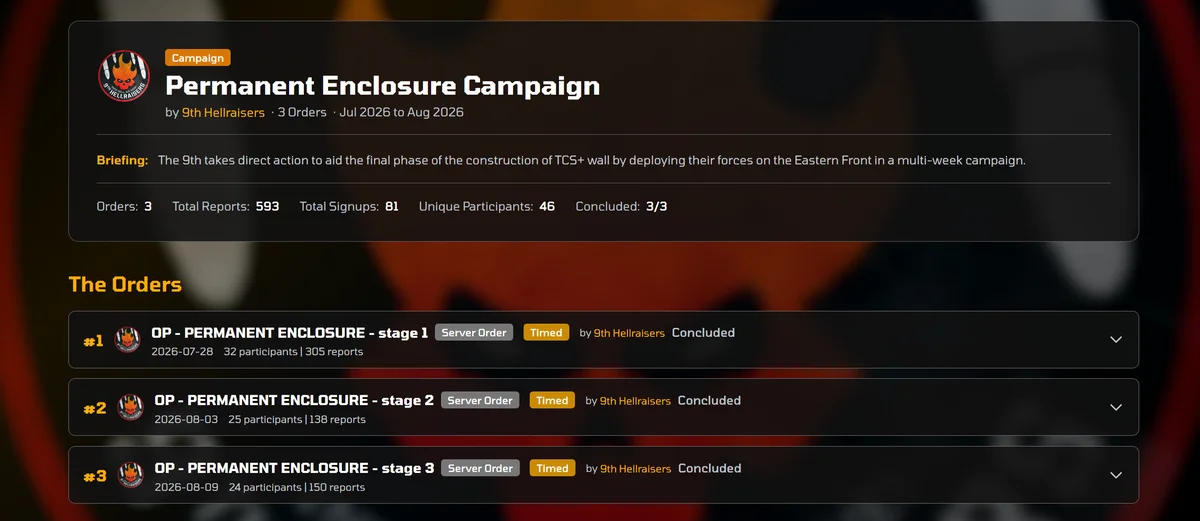
Each Campaign gets its own customizable webpage on HD2Clans.com: give the Campaign its own briefing, upload an image carousel and a Campaign logo, pick a page background. You can read the arc oldest-first or newest-first, your choice.
You can create a Campaign either through Melchior or on the website, and they end up in the same place.
- Through Melchior: in
/createop, open Advanced Options, choose New Campaign, and give it a name. The Order you're creating automatically becomes Part 1. - On the website: go to your clan's page, hit Edit Page, and find the '+ New Campaign' button. From there you can attach past Orders or create new ones and add them later.
Adding a later Order to an existing Campaign works the same way: open Advanced Options on /createop or /editops and pick the Campaign from the dropdown. You can also move an Order between Campaigns, or take it out of one entirely, from that same menu.
Chain Launch. In most cases you'll launch each Order normally, as Immediate or Scheduled. But there's a unique new option for Server Orders in a Campaign called Chain Launch, which makes the next Part start on its own, a set number of hours after the previous Part closes. Set it anywhere from 1 to 336 hours (14 days) in Advanced Options, and leave it blank if you'd rather launch by hand.
A note: Clan Orders cannot Chain Launch. Clan Orders can still be parts of a Campaign, they just have to be launched normally, using Immediate or Scheduled, instead of chained. Chain Launch is a Server Order feature only (this is because it helps prevent a lot of logic problems that could lead to clans having multiple Clan Orders running at the same time, which is not intentional).
Chain Launch is entirely optional. You never have to chain anything! A Campaign works perfectly fine as a set of Orders you launch by hand whenever each one is ready.
We've fully revamped the Melchior Guide - so there's more on Chain Launches, Campaign numbering, and customizing your Campaign's webpage in the Melchior Guide page.
Order Drafts
Building an Order can take a while: picking Metrics, writing a Briefing, choosing a Campaign. If you can't finish right now, or you want to prepare something ahead of time without launching it yet, Melchior can now hold onto your progress as an Order Draft.
While building an Order in /createop, hit Save Draft instead of Launch Operation. You can keep up to 5 Drafts at a time; open /createop and hit View Saved Drafts to load one back in or delete one you don't need anymore.
This is also handy if your clan already has an active Clan Order: you can only have one Clan Order running at a time, but now you can build the next one now and have it ready to go the moment the first one closes, instead of starting from scratch. Full details, including how Drafts work across multiple servers, are in the Melchior Guide.
Extra Statboard Channels
In Melchior-1, every server gets one Primary Statboard Channel, which is where your statboards all go. Our power-user clans that participate and create lots of Orders have requested more control than that: maybe to organize Division statboards, or keep an ally's Clan Order statboard somewhere separate, or to group statboards by themes, and so on. The new Extra Statboard Channels feature gives everyone that flexibility, letting you register up to four more channels and choose where each Order's statboard goes.
To set up Extra Statboard Channels, register them on page 3 of /setupserver. Melchior will check whether it can actually post there before adding it. Once you have at least one Extra Statboard Channel configured, /createop and /editops gain a Statboard Channel picker. Another neat quality-of-life feature is that you can also use the Extra Statboard Channels part of /setupserver to choose if you want Clan Orders your clan joins via /reviewops to go into one of your Extra Statboard Channels.
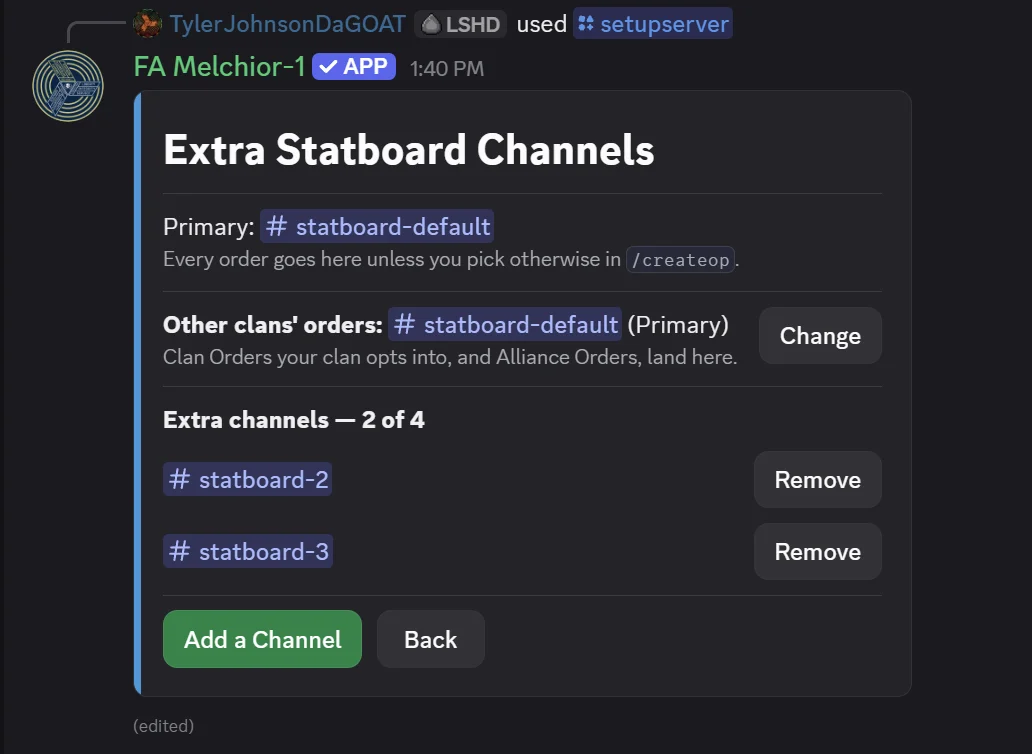
/setupserver, Page 3, 'Extra Statboard Channels' configuration menuThis is an entirely optional feature; leave it all alone and nothing changes, and every statboard still goes to your statboard channel exactly as it does today. More details on Extra Statboards Melchior Guide.
Staged Goal Orders
You guys love making Goal Orders! A normal Goal Order shows all its Metrics at once and then closes when they're all met. Some clans want more granular control over Goal Orders, and to run them in a sequence instead, with each Goal only unlocking after the previous one is finished. A Staged Goal Order now lets you do exactly that!
You can toggle on Staged in the Advanced Options menu of /createop when making a Goal Order with at least two metrics. Your statboard for a Staged Goal Order will show the whole roadmap from day one, with later Stages marked LOCKED, and /submitreport wil only show the field for whichever Stage is currently active. When a Stage's goal is met, Melchior pings your admins in your Command Center with an Advance button, and it'll just advance on its own after 24 hours if nobody does it with the button. Staged is off by default. And you guessed it - more info on Staged Goal Orders, including what happens when someone removes their reports, is in the Melchior Guide.
Goal Order Deadlines
Continuing our expansion of Goal Orders, a Goal Order can now optionally carry a time limit! Set a Deadline in Advanced Options when creating a Goal Order, anywhere from 1 hour up to 720 (30 days). The Order then closes on goals met or deadline reached, whichever comes first. The deadline also shows on the statboard and on the Order's webpage. If you don't set a deadline, nothing changes, the Goal Order will behave exactly as it always has. You can also add, change, or remove a Deadline from /editops while the Order is still open.
Closeout Briefs
You've always been able to set Briefings for your Orders, that show up on Melchior and on your Order's webpage. We've added Closeout Briefings to let you prepare a message that shows after an order ends! You'll find (Optional) Closeout Brief directly under the Briefing line on /createop and /editops. It stays completely hidden, including from you, until the Order closes, then appears alongside the Briefing both in Discord and on the Order's webpage. It's available on every Order type.

Everything Else
There's been a bunch of other smaller improvements throughout the ecosystem, summarized below...
Rebuilt homepage. The homepage is now a set of daily-rotating feature bands: a Featured Clan, a Featured Helldiver, Featured Operations, a sliding carousel of ships from the hangar with their real hull bars and XP, a Fleet Conquest section with a top 3 and a live weekly-challenge countdown, and the latest Stories and news.
Operations dashboard moved. The Orders list now lives at HD2Clans.com/operations, with the navbar updated to match. Old links to operations redirect automatically.
Galactic map: the Illuminate Void. The Galactic Map now draws the Illuminate Void as a proper region of space. All deployed ships are now visible on the Galactic Map as well!
Hangar QOL. Page-wide ship sorting on your clan hangar page; leaders can now Hide Reserve ships (including Super Destroyers) from your clan hangar page; the public hangar API now includes Battle Groups.
Fleet Conquest award details. Tapping an achievement, on the main Fleet Conquest menu or on a user's profile, now shows what percent of all users have completed it.
Creation panels stay alive much longer. /createop, /createaward, and /editawards used to go unresponsive after 10 minutes without a click, easy to hit if you stepped away mid-workflow. They now stay live for up to a full hour of inactivity.
Batch reporting is faster. /submitbatchreport now asks for the player count once, up front, then keeps the order picker open so that same count covers as many Orders as you want to report to. Reporting to multiple Orders using Batch Reports should be much faster now.
We've also made a number of other quality-of-life and subtle user experience improvements throughout Order creation and editing. Below is also quick list of Bug Fixes we've also shipped - and then we'll close out today's post after that.
Bug Fixes
- Fixed a rare bug where undoing a report could also remove an Honor Award from you
- Fixed a rare bug where an Order could be marked closed without handing out its completion awards
- Fixed a bug where reordering your clan page's sections (news, image carousel, Divisions, Operations, Stories, Campaigns) saved correctly but silently snapped back to the default order on reload
- Fixed a bug where Newsletter reminders kept arriving for clans people had left; reminders now follow the clans you actually administer, and every switch is reachable from
/notifs - Fixed a bug preventing some clans and divisions from removing their logo
- Fixed a bug that caused page navigation between Battle Group pages to briefly flash white
- Fixed a massive, life-changing bug where the Deployment emojis in Melchior had the wrong color gradient
- Fixed a bug where some HD2Clans site surfaces (Operation Briefings, Ship Lore, etc.) didn't properly show line breaks you'd entered
- Additional bug fixes and security improvements
A huge thank you to all of you for continually making this the best clan community in Helldivers 2, as well as to the beta testing group of clans for the 6.0 update. An extra big thanks to .calibaknight, .t.wrecks, beerded_raider, bladeofhorkos, blyatabix, damnson_bloodfang, dwarvenarmory, efrenespartano, flaty_1337, HCDR Emps [597th/FA], ih8evry1eqlly, imVeryOLD111000, incessant_vagabond, inquisitor023, jackr5, lancecastle, lightningcro, limrix3, linmad, NEM, omegaicarus, Orbital, praetor_gallus, pyronut31, roronoazoro808, Soup, stinkyteef, and voidastra_, for helping to keep HD2Clans.com alive during the last month!
While other services out there are finding new ways to charge you for features, everything on Melchior and HD2Clans.com is free, and always will be - because we truly believe that clans are for everyone. If you want to help our mission to stay free forever, consider supporting us with a small contribution here!
That's all for today. We hope you enjoy the new features! For questions or support, head to our Support Server: http://hd2clans.com/support